BLUETOOTH CONTROLLED ROBOT

HELLO FRIENDS,
I AM KUNAL AND TODAY WE ARE GOING TO TALK ABOUT MAKING A BLUETOOTH CONTROLLED ROBOT.
FIRST OF ALL IF YOU WANT TO START ELECTRONICS THEN YOU NEED TO USE SOME BETTER EQUIPMENTS. GET OUT OF THOSE CONFUSING CIRCUITS AND START USING DEVELOPMENT BOARDS AND LETS KNOW ABOUT SOME EQUIPMENTS FOR MAKING A BLUETOOTH CONTROLLED ROBOT.
HERE ARE SOME BASIC EQUIPMENTS THAT YOU NEED TO MAKE IT.

HERE ARE SOME BASIC EQUIPMENTS THAT YOU NEED TO MAKE IT.
1. ARDUINO MEGA/ UNO

Due to more number of pins it becomes easy for users to start with and no problem while connections.
click below in the link to buy:
https://www.amazon.in/gp/product/B07F44YK11/ref=as_li_tl?ie=UTF8&camp=3638&creative=24630&creativeASIN=B07F44YK11&linkCode=as2&tag=kunnu31-21&linkId=e4fc673dc61da3ad43f6404a0d9aff67">Easy Electronics ARDUINO MEGA 2560 with USB Cable</a><img src="//ir-in.amazon-adsystem.com/e/ir?t=kunnu31-21&l=am2&o=31&a=B07F44YK11" width="1" height="1" border="0" alt="" style="border:none !important; margin:0px !important
or
https://amzn.to/2VvjX2T
FOR ARDUINO UNO CLICK HERE
https://www.amazon.in/gp/product/B015C7SC5U/ref=as_li_tl?ie=UTF8&camp=3638&creative=24630&creativeASIN=B015C7SC5U&linkCode=as2&tag=kunnu31-21&linkId=502b4787ee64e2a4d171287f7bd62740
OR
https://amzn.to/2C3FoRe
2. GEAR MOTORS FOR ROBOTS
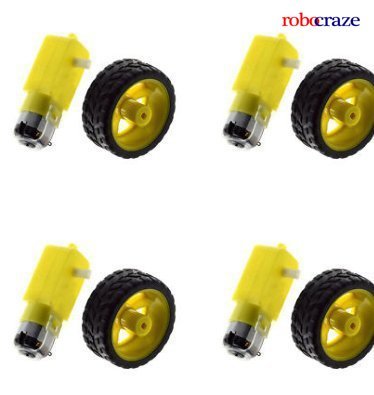
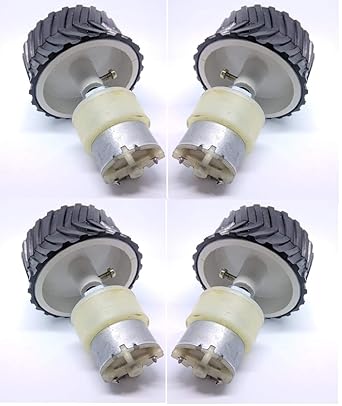 A gear motor is a specific type of electrical motor that is designed to produce high torque while maintaining a low horsepower, or low speed, motor output. These are really perfect for your own robot. These are the most efficient because of their high torque and can easily hold a lot of weight.


or
https://amzn.to/2VvjX2T
FOR ARDUINO UNO CLICK HERE
https://www.amazon.in/gp/product/B015C7SC5U/ref=as_li_tl?ie=UTF8&camp=3638&creative=24630&creativeASIN=B015C7SC5U&linkCode=as2&tag=kunnu31-21&linkId=502b4787ee64e2a4d171287f7bd62740
OR
https://amzn.to/2C3FoRe
2. GEAR MOTORS FOR ROBOTS
TO BUY THIS PRODUCT CLICK BELOW:
OR
OR
THESE ARE SOME DIFFERENT TYPE OF MOTORS AND EVEN GREATER IN QUANTITY
BUT THESE HAVE COMPARITIVELY LOW TORQUE BUT EFFICIENT THAN THAT ONE ONE ONLY.
TO BUY THESE MOTORS CLICK ON THE LINK PROVIDED:
OR
3. SOME CONNECTING WIRES

Jumper wires are simply wires that have connector pins at each end, allowing them to be used to connect two points to each other without soldering.Jumper wires are typically used with breadboards and other prototyping tools in order to make it easy to change a circuit as needed. These pins help you to easily insert and remove the connections.
To buy these click on the link below:
OR
4. BLUETOOTH MODULE HC-05
HC-05 module is an easy to use Bluetooth SPP (Serial Port Protocol) module, designed for transparent wireless serial connection setup. Serial port Bluetooth module is fully qualified Bluetooth V2.0+EDR (Enhanced Data Rate) 3Mbps Modulation with complete 2.4GHz radio transceiver and baseband. These recieve data from your mobile and help to use for controlling the robot.
To buy this module, click below:
or
5. MOTOR DRIVER MODULE
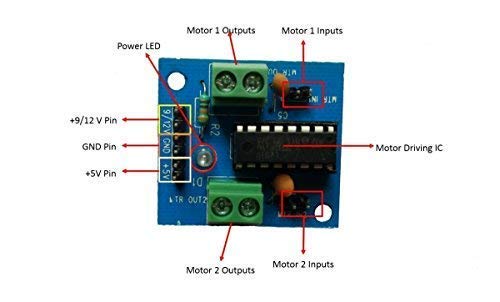
The Motor Driver is a module for motors that allows you to control the working speed and direction of two motors simultaneously .This Motor Driver is designed and developed based on L293D IC. L293D is a 16 Pin Motor Driver IC. This is designed to provide bidirectional drive currents at voltages from 5 V to 36 V.
To buy these click on the link below:
or
https://amzn.to/2GVyi5g
HERE'S ANOTHER TYPE OF MOTOR DRIVER FOR TWO MOTORS
https://www.amazon.in/gp/product/B071KM1CZ8/ref=as_li_tl?ie=UTF8&camp=3638&creative=24630&creativeASIN=B071KM1CZ8&linkCode=as2&tag=kunnu31-21&linkId=69cb634a5add3daa12d795982c5bd1fb
6. LEAD ACID BATTERY (4 V)
 Lead acid batteries generate electricity through a double sulfate chemical reaction. Lead and lead dioxide, the active materials on the battery's plates, react with sulfuricacid in the electrolyte to form lead sulfate. But you need 12 v to drive the motors so you may connect three 4V batteries in series to do so, the circuit for it is provided below.

TO BUY THIS PRODUCT CLICK BELOW:
https://www.amazon.in/gp/product/B07JNNK789/ref=as_li_tl?ie=UTF8&camp=3638&creative=24630&creativeASIN=B07JNNK789&linkCode=as2&tag=kunnu31-21&linkId=e16f7bcc1ab7a1b82e9638de04e06a6c
OR
https://amzn.to/2BXX4ha
NOW LET'S LOOK ON THE CIRCUIT DIAGRAM

NOW CONNECT THE ARDUINO TO YOUR COMPUTER AND TYPE THE FOLLOWING CODE:
int m1a = 9; int m1b = 10; int m2a = 11; int m2b = 12; char val; void setup() { pinMode(m1a, OUTPUT); // Digital pin 10 set as output Pin pinMode(m1b, OUTPUT); // Digital pin 11 set as output Pin pinMode(m2a, OUTPUT); // Digital pin 12 set as output Pin pinMode(m2b, OUTPUT); // Digital pin 13 set as output Pin Serial.begin(9600); } void loop() { while (Serial.available() > 0) { val = Serial.read(); Serial.println(val); } if( val == 'F') // Forward { digitalWrite(m1a, HIGH); digitalWrite(m1b, LOW); digitalWrite(m2a, HIGH); digitalWrite(m2b, LOW); } else if(val == 'B') // Backward { digitalWrite(m1a, LOW); digitalWrite(m1b, HIGH); digitalWrite(m2a, LOW); digitalWrite(m2b, HIGH); } else if(val == 'L') //Left { digitalWrite(m1a, LOW); digitalWrite(m1b, LOW); digitalWrite(m2a, HIGH); digitalWrite(m2b, LOW); } else if(val == 'R') //Right { digitalWrite(m1a, HIGH); digitalWrite(m1b, LOW); digitalWrite(m2a, LOW); digitalWrite(m2b, LOW); } else if(val == 'S') //Stop { digitalWrite(m1a, LOW); digitalWrite(m1b, LOW); digitalWrite(m2a, LOW); digitalWrite(m2b, LOW); } else if(val == 'I') //Forward Right { digitalWrite(m1a, HIGH); digitalWrite(m1b, LOW); digitalWrite(m2a, LOW); digitalWrite(m2b, LOW); } else if(val == 'J') //Backward Right { digitalWrite(m1a, LOW); digitalWrite(m1b, HIGH); digitalWrite(m2a, LOW); digitalWrite(m2b, LOW); } else if(val == 'G') //Forward Left { digitalWrite(m1a, LOW); digitalWrite(m1b, LOW); digitalWrite(m2a, HIGH);
digitalWrite(m2b, LOW); } else if(val == 'H') //Backward Left { digitalWrite(m1a, LOW); digitalWrite(m1b, LOW); digitalWrite(m2a, LOW); digitalWrite(m2b, HIGH); } }
USE THE LINK TO DOWNLOAD THE APP FOR CONTROLLING THE ROBOT:
PLEASE LEAVE A POSITIVE COMMENT FOR OUR BLOG AND SHARE IT IF YOU LIKE IT.
ALSO VISIT OTHER BLOG FOR EMP JAMMER:
https://arduinokunal.blogspot.com/2019/03/blog-post_2.html
HERE'S ANOTHER TYPE OF MOTOR DRIVER FOR TWO MOTORS
https://www.amazon.in/gp/product/B071KM1CZ8/ref=as_li_tl?ie=UTF8&camp=3638&creative=24630&creativeASIN=B071KM1CZ8&linkCode=as2&tag=kunnu31-21&linkId=69cb634a5add3daa12d795982c5bd1fb
6. LEAD ACID BATTERY (4 V)

https://www.amazon.in/gp/product/B07JNNK789/ref=as_li_tl?ie=UTF8&camp=3638&creative=24630&creativeASIN=B07JNNK789&linkCode=as2&tag=kunnu31-21&linkId=e16f7bcc1ab7a1b82e9638de04e06a6c
OR
https://amzn.to/2BXX4ha
NOW LET'S LOOK ON THE CIRCUIT DIAGRAM

NOW CONNECT THE ARDUINO TO YOUR COMPUTER AND TYPE THE FOLLOWING CODE:
int m1a = 9; int m1b = 10; int m2a = 11; int m2b = 12; char val; void setup() { pinMode(m1a, OUTPUT); // Digital pin 10 set as output Pin pinMode(m1b, OUTPUT); // Digital pin 11 set as output Pin pinMode(m2a, OUTPUT); // Digital pin 12 set as output Pin pinMode(m2b, OUTPUT); // Digital pin 13 set as output Pin Serial.begin(9600); } void loop() { while (Serial.available() > 0) { val = Serial.read(); Serial.println(val); } if( val == 'F') // Forward { digitalWrite(m1a, HIGH); digitalWrite(m1b, LOW); digitalWrite(m2a, HIGH); digitalWrite(m2b, LOW); } else if(val == 'B') // Backward { digitalWrite(m1a, LOW); digitalWrite(m1b, HIGH); digitalWrite(m2a, LOW); digitalWrite(m2b, HIGH); } else if(val == 'L') //Left { digitalWrite(m1a, LOW); digitalWrite(m1b, LOW); digitalWrite(m2a, HIGH); digitalWrite(m2b, LOW); } else if(val == 'R') //Right { digitalWrite(m1a, HIGH); digitalWrite(m1b, LOW); digitalWrite(m2a, LOW); digitalWrite(m2b, LOW); } else if(val == 'S') //Stop { digitalWrite(m1a, LOW); digitalWrite(m1b, LOW); digitalWrite(m2a, LOW); digitalWrite(m2b, LOW); } else if(val == 'I') //Forward Right { digitalWrite(m1a, HIGH); digitalWrite(m1b, LOW); digitalWrite(m2a, LOW); digitalWrite(m2b, LOW); } else if(val == 'J') //Backward Right { digitalWrite(m1a, LOW); digitalWrite(m1b, HIGH); digitalWrite(m2a, LOW); digitalWrite(m2b, LOW); } else if(val == 'G') //Forward Left { digitalWrite(m1a, LOW); digitalWrite(m1b, LOW); digitalWrite(m2a, HIGH);
digitalWrite(m2b, LOW); } else if(val == 'H') //Backward Left { digitalWrite(m1a, LOW); digitalWrite(m1b, LOW); digitalWrite(m2a, LOW); digitalWrite(m2b, HIGH); } }
USE THE LINK TO DOWNLOAD THE APP FOR CONTROLLING THE ROBOT:
PLEASE LEAVE A POSITIVE COMMENT FOR OUR BLOG AND SHARE IT IF YOU LIKE IT.
ALSO VISIT OTHER BLOG FOR EMP JAMMER:
https://arduinokunal.blogspot.com/2019/03/blog-post_2.html

Good...keep it on.
ReplyDeleteThanks keep supporting us
Delete